WhatsApp automated messages: how they count and when Meta charges
Contacts are unlimited: only the messages your automation sends count. How many each plan includes, what happens when you reach them and how Meta's 1,000 free messages per number work.
On WhatsApp contacts are unlimited: it doesn't matter how many people message you or how many messages they send. What counts are the messages your automation sends, and your plan includes a number of them each month.
Unlimited contacts on every plan.
Your automation replies when they write the keyword or tap a button, not to every message.
Pro gives you 10,000 a month: ten times more.
- Your customerWrites “PRICES”Doesn't count
- Your automationReplies with your prices and a button1 message
- Your customerTaps “Book”Doesn't count
- Your automationSends your booking calendar1 message
- Their window renews until 11:30 tomorrow
Every message from your customer gives you 24 more hours to reply. Outside that time, only with a template approved by Meta (Pro and Max).
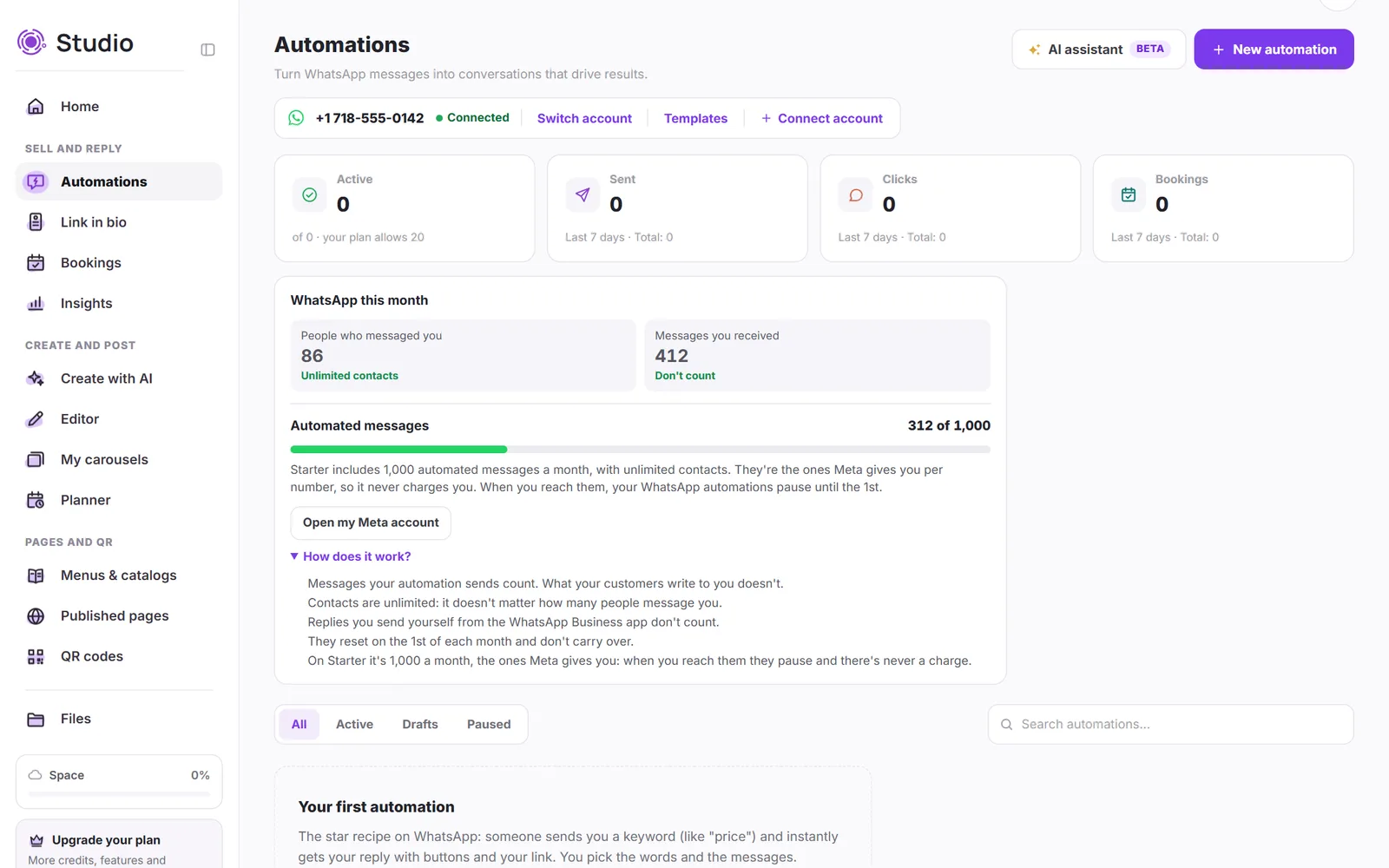
- Starter1,000Your planCovers you: 400 left over
- Pro10,000Covers you: 9,400 left over
- MaxNo limit
How many each plan includes
| Plan | Automated messages a month | WhatsApp numbers |
|---|---|---|
| Starter | 1,000 | 1 |
| Pro | 10,000, across all your numbers | Up to 3 |
| Max | No limit | Up to 5 |
They reset on the 1st of each month and unused ones don't carry over.
What counts and what doesn't
| Counts? | |
|---|---|
| Messages your automation sends (replies, buttons, links, follow-ups) | Yes |
| What your customers write to you | |
| What you reply yourself from the WhatsApp Business app | |
| Templates (to write first yourself, on Pro and Max) | They don't count toward your plan, but Meta always charges them |
Meta's 1,000 free messages
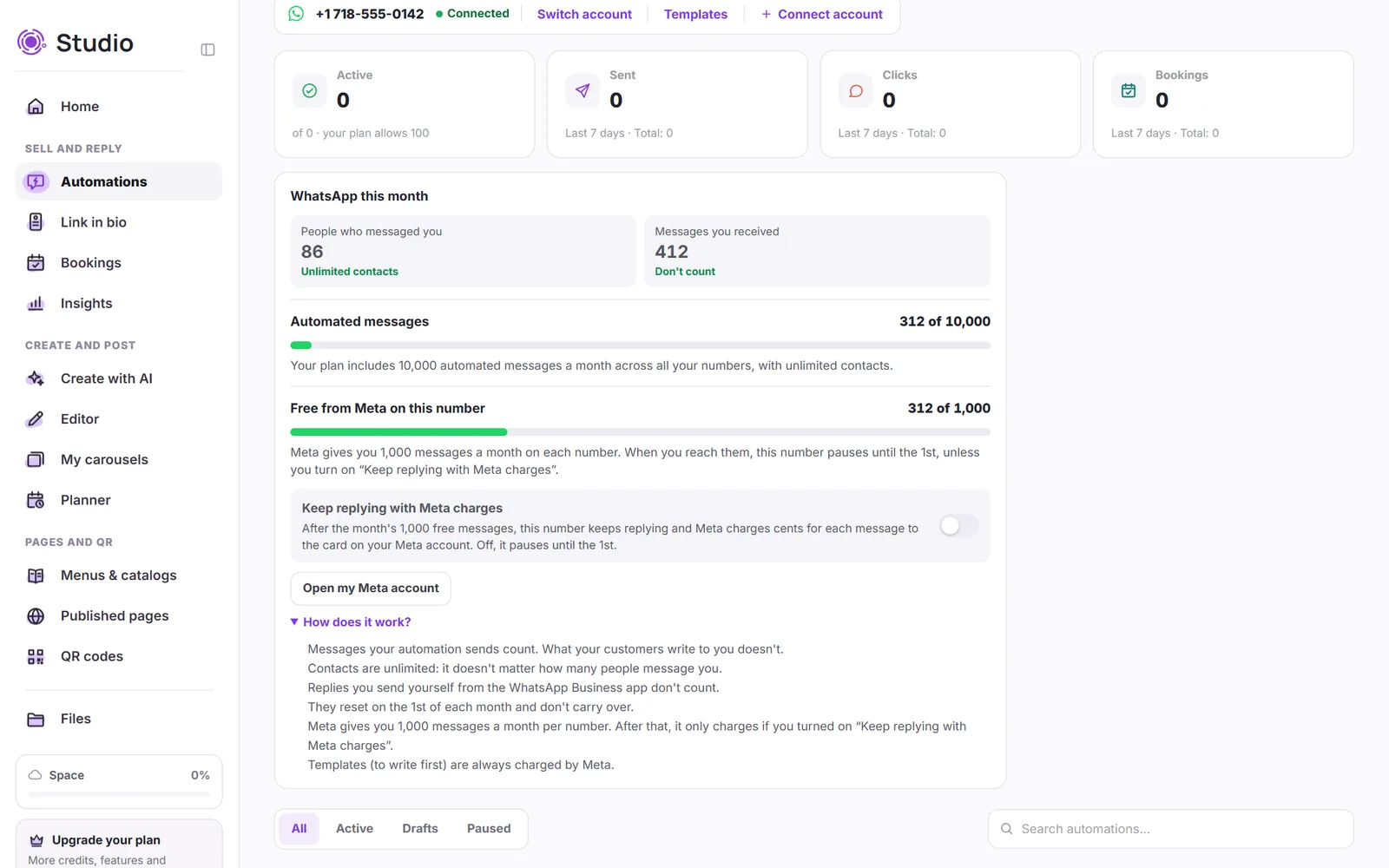
On top of your plan, Meta doesn't charge for the first 1,000 messages a month on each number. On Starter they're the same 1,000 from your plan, so there's never a Meta charge. On Pro and Max, each number gets its own 1,000 free and you decide what happens after that:
| “Keep replying with Meta charges” | When a number reaches 1,000 |
|---|---|
| Off (the default) | That number pauses until the 1st. Meta doesn't charge you anything. |
| On | It keeps replying and Meta charges cents for each message to the card on your Meta account (without a card, Meta doesn't deliver them). |
What Meta charges after the 1,000 depends on your customer's country (by their number's country code), not yours. Approximate prices, in US dollars:
| Your customer's country | Per 1,000 messages | Per message |
|---|---|---|
| Mexico | $8.50 | $0.0085 |
| Colombia | $0.80 | $0.0008 |
| Argentina | $26.00 | $0.0260 |
| Chile | $20.00 | $0.0200 |
| Peru | $30.00 | $0.0300 |
| Brazil | $6.80 | $0.0068 |
| US and Canada | $3.40 | $0.0034 |
| Spain | $20.00 | $0.0200 |
| Other Latin American country | $11.30 | $0.0113 |
The meter
In Automations, with your WhatsApp number selected, you see how many people messaged you, how many of your plan's automated messages you've used and, on Pro and Max, that number's free Meta messages with their switch.
What happens when you reach them
- When you reach your plan's limit, your WhatsApp automations pause until the 1st. Messages keep reaching your app and you reply yourself.
- On Pro and Max, if a number reaches Meta's 1,000 free messages with the switch off, that number pauses until the 1st.
- We let you know in the bell at 80, 95 and 100%.
Turn on “Keep replying with Meta charges” (Pro and Max)
Open your number's meter
In Automations, pick your WhatsApp number. The switch is under Meta's free messages.
Turn it on
It's per number: you can turn it on for one and leave it off for another.
Add a card on Meta
Tap Add a card on Meta (or Open my Meta account). Meta keeps the card: SocialMaker never sees it.
Are the 1,000 messages per contact or for everyone?
For everyone: they're per month, and contacts are unlimited. If 10 customers send you 50 messages each, those 500 don't count; your automation's replies do, for example 4 to each one, 40 in total.
Does SocialMaker charge me anything for WhatsApp?
No. WhatsApp comes with your plan from Starter up, with unlimited contacts. Meta only charges if you turned on “Keep replying with Meta charges” (Pro and Max) or for templates you send.
Can I lift the pause before the 1st?
Yes: by switching to a plan with more messages. On Pro and Max, if the pause is because a number used Meta's 1,000 free messages, by turning on “Keep replying with Meta charges”.
Where do I see what Meta charged me?
In your Meta account, from Open my Meta account on the meter. The meter also tells you how many messages Meta has already charged this month.