How to Add a WhatsApp Link to Instagram (and Get People to Message You)
Create your free WhatsApp link and add it to your profile, bio, Stories and DMs, with the right number format for your country. Step by step.

“Message me on WhatsApp” is one of the most common lines on business profiles, and for good reason: in Brazil, 8 out of 10 small business owners say WhatsApp is their main channel to talk to customers and sell, and 57% use Instagram (Sebrae, 2026).
The problem is the path from one app to the other: a bare phone number in the bio that nobody copies, a broken link that says the number is invalid, or a button nobody can find. In this guide you'll create your link in a minute, add it to the 6 places on Instagram where people tap the most and see what makes people actually message you.
Create your WhatsApp link for free
A WhatsApp link opens a chat with you without the person having to save your number. Pick your country, type your number the way you dial it and, if you like, a message that shows up already written:
WhatsApp link generator
Your link
Type your number and your link shows up here, ready to copy.
Under the hood, the link looks like this: wa.me/ followed by your full number with the country code, without the + sign, spaces, dashes or brackets, and without a leading 0. A US number, for example, becomes wa.me/13055551234. If you add ?text= and a message at the end, that text appears in the chat, ready to send. That's how the WhatsApp Help Center explains it.
The 6 places on Instagram to add your WhatsApp
They don't all perform the same. Here are the six, from most visible to most automatic:
On your profile, with the WhatsApp link
Instagram lets you add your WhatsApp right on your profile: tap Edit profile, then Add links and Add WhatsApp link, and enter your number (Instagram Help Center). If your account is public, anyone can see that link, and they see your number when they open it.
As a contact button, with WhatsApp Business
If you use the WhatsApp Business app and your Instagram is a professional account, link them from WhatsApp Business: Tools, Facebook & Instagram, Instagram. A button to message you on WhatsApp shows up on your profile (WhatsApp Help Center).
In your bio links
Instagram allows up to 5 links in your bio. Paste your WhatsApp link there with a clear title, like “Orders on WhatsApp”. The first one is the one people see most.
In your Stories and Highlights
With the link sticker, which every account can use, you can add your link to any Story. Save it to a Highlight called “Orders” or “Bookings” so it stays pinned to your profile.
In your DMs, with automatic replies
Ask people in your posts to comment a word, like ORDER, and reply instantly with a DM that has a button to your WhatsApp. That way you answer even while you're busy or asleep.
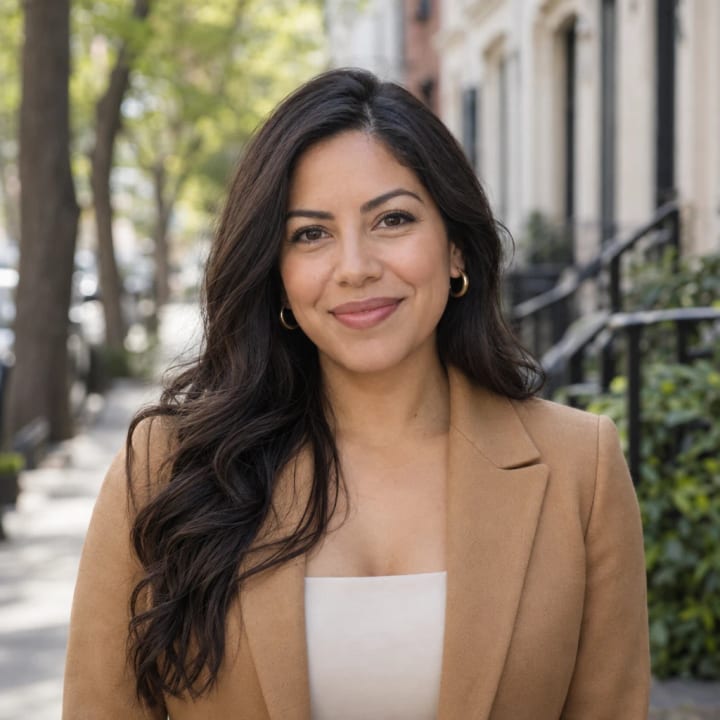
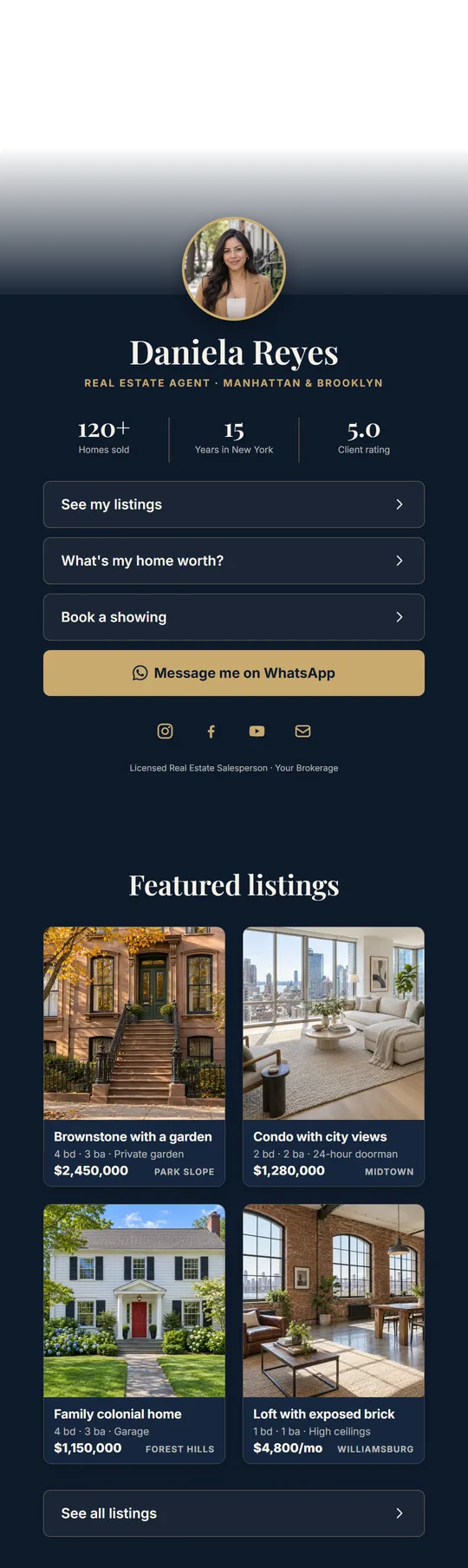
On your link in bio page
If you have several things to show, put one page with everything in your bio: the WhatsApp button at the top and your products, bookings and location below. In SocialMaker you pick your country with its flag, type your number the way you dial it and the button builds itself, Argentina's rules included.






| Place | Who can use it | Best part | What it lacks |
|---|---|---|---|
| WhatsApp link on your profile | Any account | Official and in plain sight | Only goes to your chat |
| WhatsApp Business button | Professional accounts with WhatsApp Business | Looks like a real contact button | You need to link both apps |
| Link in your bio | Any account | Always visible | Competes with your other links |
| Story sticker | Any account | Reaches people already watching you | Lasts 24 hours unless you highlight it |
| Automatic reply | With a tool like SocialMaker | Arrives in seconds, at any hour | You set it up once |
| Link in bio page | Any account | WhatsApp, products, bookings and map together | One more tap to the chat |
How to know where each message comes from
A simple trick: use a different pre-written message in each place. In your bio, “Hi, I came from your profile”; in Stories, “Hi, I saw your Story”; in a product Reel, “Hi, I want the strawberry cake”. When people message you, you'll know what worked without having to ask.
Should you send everyone to WhatsApp?
Not always. Every jump from one app to another loses some people, and many prefer to ask by DM on Instagram without switching apps. What works best is combining both: you reply instantly on Instagram with the price and details, and offer WhatsApp to close the sale, arrange delivery or book.
Speed matters more than the app. A classic Harvard Business Review study found that companies that replied within the first hour were nearly 7 times more likely to have a meaningful conversation with the customer than those that replied an hour later (HBR, 2011), and according to the Sprout Social Index 2025, 73% of people expect a reply within 24 hours.



Getting people to message you: 5 details that make the difference
- A clear invitation. “Orders on WhatsApp” or “Message me to book” work better than a bare number.
- A pre-written message. With the text ready, people just tap send and don't get stuck wondering what to say.
- An automatic welcome on WhatsApp. In WhatsApp Business you can turn on a greeting message that's sent automatically to people who message you for the first time or after 14 days without talking.
- A number just for the business. Your number is visible to anyone who taps the link: if you don't want to mix it with your personal life, use a separate one.
- Your hours in plain sight. If you don't answer at night, say so in your bio or greeting message. Nobody minds if they know when you'll reply.

New in 2026: your WhatsApp username
WhatsApp is adding usernames: an @ people can use to message you without knowing your number. According to WhatsApp’s official announcement, anyone can reserve theirs since June 29, 2026, and they’re being turned on country by country over the following months: the app lets you know when yours is ready.
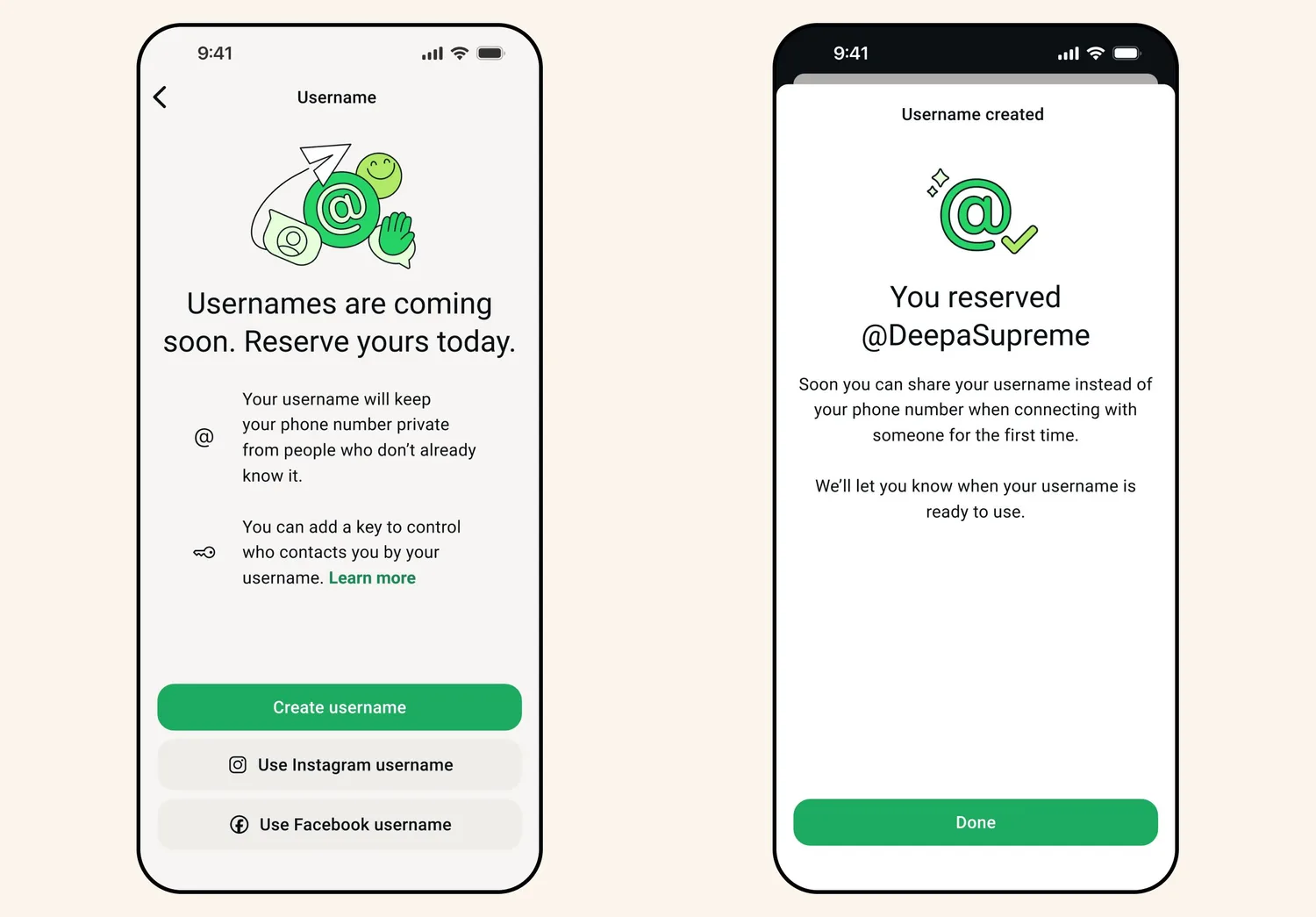
- Reserve it now. In WhatsApp, go to Settings > Account > Username. If you sell on Instagram, you can use the same name as your Instagram account.
- Your link will be wa.me/yourname. According to WhatsApp Help, every username creates its own direct link, and your QR code includes it too.
- Your personal number stays private. People who message you for the first time by username see your @, not your number, unless they already have it saved. On WhatsApp Business, the business number is still shown on the profile, as the business help page explains.
- Careful with the username key. WhatsApp lets you add a key people must type to send you their first message. It’s useful for personal use; to sell, leave it off or you’ll lose customers along the way.
- Your number keeps working. Links with your number still work: anyone who already has it can message you as usual.
If the link doesn't open: common mistakes
- You added the + or spaces. The link only takes numbers: wa.me/13055551234, not wa.me/+1 305 555 1234.
- You left the 0 or the 15. The long-distance 0 and the 15 of Argentine mobile numbers don't go in the link.
- The country code is missing. Without it, WhatsApp doesn't know which country the number is from.
- That number doesn't have WhatsApp. If opening the link says the number isn't on WhatsApp, check it's the same one you registered the app with.
- An intermediate page opens. Sometimes the link first shows a WhatsApp page inside Instagram's browser: tap the green button to continue to the chat.
- On a computer it opens WhatsApp Web. That's normal: on a computer, the link opens WhatsApp Web or the desktop app.
How to do it with SocialMaker
Create your link in bio for free
Pick your name (socialmaker.ai/yourname) and a design.
Add the WhatsApp button
Pick your country with its flag and type your number the way you dial it, or use your WhatsApp username. If you like, add the message that shows up written. SocialMaker builds the link and shows you where it will open.
Add your address to your Instagram bio
Paste socialmaker.ai/yourname in your profile links. It also works for TikTok, Facebook or your WhatsApp status.
Reply to comments with your WhatsApp
Create an automation: when someone comments the word you choose, they instantly get a DM with the button to your WhatsApp, and every tap is counted.
Frequently asked questions
How do I create a WhatsApp link?
Type wa.me/ and your full number with the country code, without +, spaces or dashes. For example: wa.me/13055551234. Or use the generator on this page: pick your country, type your number and copy the link.
Can I add WhatsApp to Instagram without a business account?
Yes. The WhatsApp link on your profile, your bio links and the Story sticker work for any account. The WhatsApp Business contact button requires a professional account and the WhatsApp Business app.
How do I add WhatsApp and other links at the same time?
Instagram lets you add up to 5 links in your bio. If you want more, or want them to show with a photo and a button, use a link in bio page with your WhatsApp at the top and everything else below.
Can I add my WhatsApp link to a post or a Reel?
According to the Meta Help Center, links in posts and Reels are part of Meta One's paid plans, starting with Advanced. For free you still have your bio, Stories and DMs: ask people to comment a word and send the link by DM.
Why does my link say the number is invalid?
It's almost always the format: the country code is missing, there's an extra 0, + or space, or the 9 is missing for Argentina. Build the link with the generator and test it from another phone.
Is my number visible if I add the link?
With your number link, yes: anyone who taps it opens a chat with your number. With your WhatsApp username (being turned on country by country), people messaging you for the first time see your @, not your number. If you don't have it yet, use a number just for the business.
Can I use my WhatsApp username instead of my number?
Yes, once WhatsApp turns it on in your country. Your link is wa.me/ plus your username, for example wa.me/yourbusiness, and the pre-filled message is added to the link the same way as with a number. Reserve it in Settings > Account > Username.
Can I add a message that shows up already written?
Yes. Add ?text= and your message at the end of the link, or type it in the generator. It also helps you know where each person came from.
Does SocialMaker reply for me on WhatsApp?
No. SocialMaker replies automatically on Instagram and Facebook and helps you bring people to your WhatsApp with buttons and your link in bio. On WhatsApp you can turn on the WhatsApp Business greeting message.
Adding WhatsApp to Instagram takes a minute; getting people to message you is about keeping the path clear: a link that works, a direct invitation and a fast reply. To keep going, see how to automate Instagram or what to put in your link in bio.

Written byAndros BlandonSocialMaker