How to take bookings on Instagram without losing them in your DMs
A guide to taking bookings on Instagram: the “Book” button, a calendar in your bio, automatic replies, messages to copy and reminders.
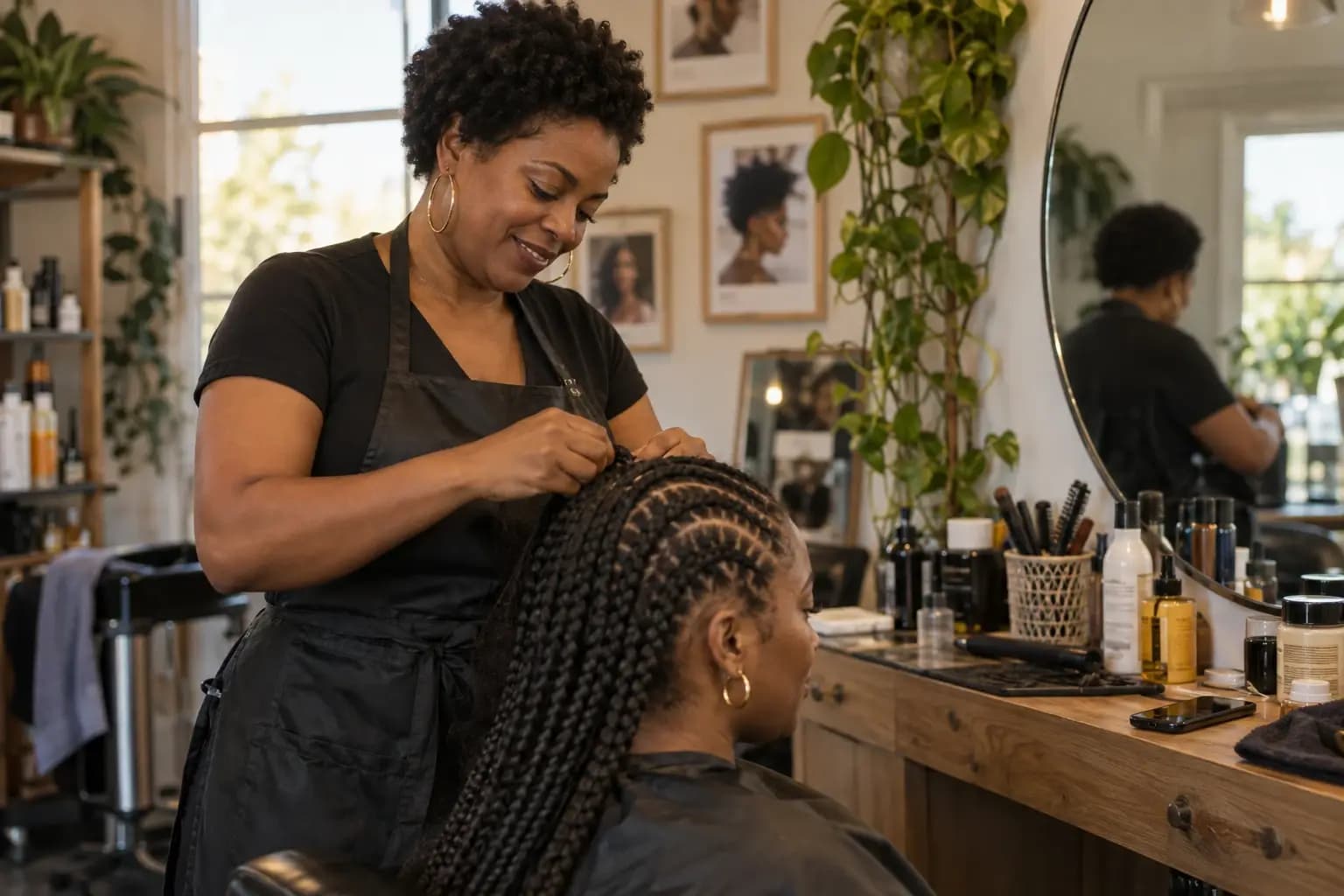
It's 11 p.m. and a message comes in: “Any openings on Saturday?” You see it the next morning, you reply… and that person already booked somewhere else. If you work by appointment (nails, hair, barbering, beauty, consultations, classes or tattoos), this happens every week, and every time it's a client walking away.
It's not that you don't care: people want it sorted right away. According to the Sprout Social Index 2025, 73% of social media users will buy from a competitor if a brand doesn't respond on social, and about three in four expect a reply within 24 hours or less. In salons and spas, 81% of regular clients call at least sometimes to manage their appointments outside business hours, and 71% have given up on booking because it was too hard to get in touch or book online (Zenoti, 2025).
The good news: you can get it under control without living on your phone. In this guide you'll see the three ways to take bookings on Instagram, how to add the “Book” button, how to set up your system in 4 steps, messages ready to copy, examples for your type of business, and the mistakes that lose the most appointments.
The 3 ways to take bookings on Instagram
| Option | How it works | Keep in mind |
|---|---|---|
| Profile button | A “Book” button next to “Follow” that opens a partner booking app. | It depends on that app and isn't always available. |
| Link in bio | Your booking page in your profile link. | It always works, but people have to go to your profile to find it. |
| Messages and comments | You answer “any openings?” with a button that opens your calendar. | It's where the questions arrive; done by hand, you have to answer them one by one. |
How to add the “Book now” button to your Instagram profile
The “Book now” button shows up next to “Follow” and “Message,” but Instagram doesn't provide it on its own: it connects to a booking app on its partner list, such as Square, Fresha, Booksy or Setmore. Calendly, for example, isn't on it. Also, you can only show one action button at a time. If you use one of those apps, these are the current steps:
Switch to a professional account
From your profile, open the menu and go to Settings and activity → Account type and tools → Switch to professional account. Both creator and business accounts work.
Open the action buttons
Tap Edit profile and, under Public business information, tap Action buttons.
Pick “Book now” and your app
Select the button, choose the booking app you work with, log in to it and tap Done.
If you don't use any of those apps, you don't need it: your calendar link in your bio does the same job and works with any account. And keep in mind that the profile button is only seen by people who visit your profile; most bookings start with a question in a comment or a message.
What works best is combining the last two: your calendar in your link in bio for people who visit your profile, and an automatic reply for people who ask by message or in a comment. Here's how to set it up with SocialMaker:
Step 1: set up your online calendar
In SocialMaker's online booking calendar, create your services with their length and price, set the hours you work, and block the days you're off. You also choose where each appointment happens: at your place, on Zoom, Google Meet, WhatsApp or a phone call.
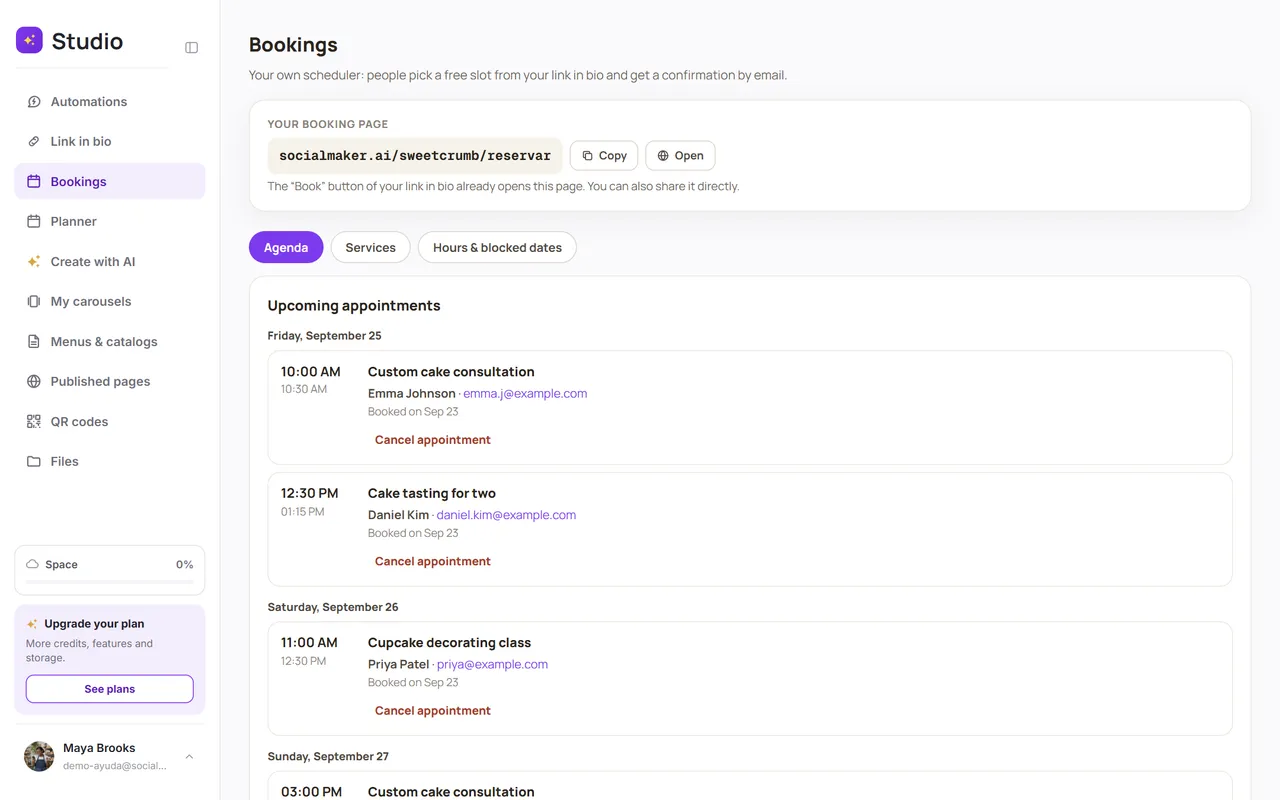
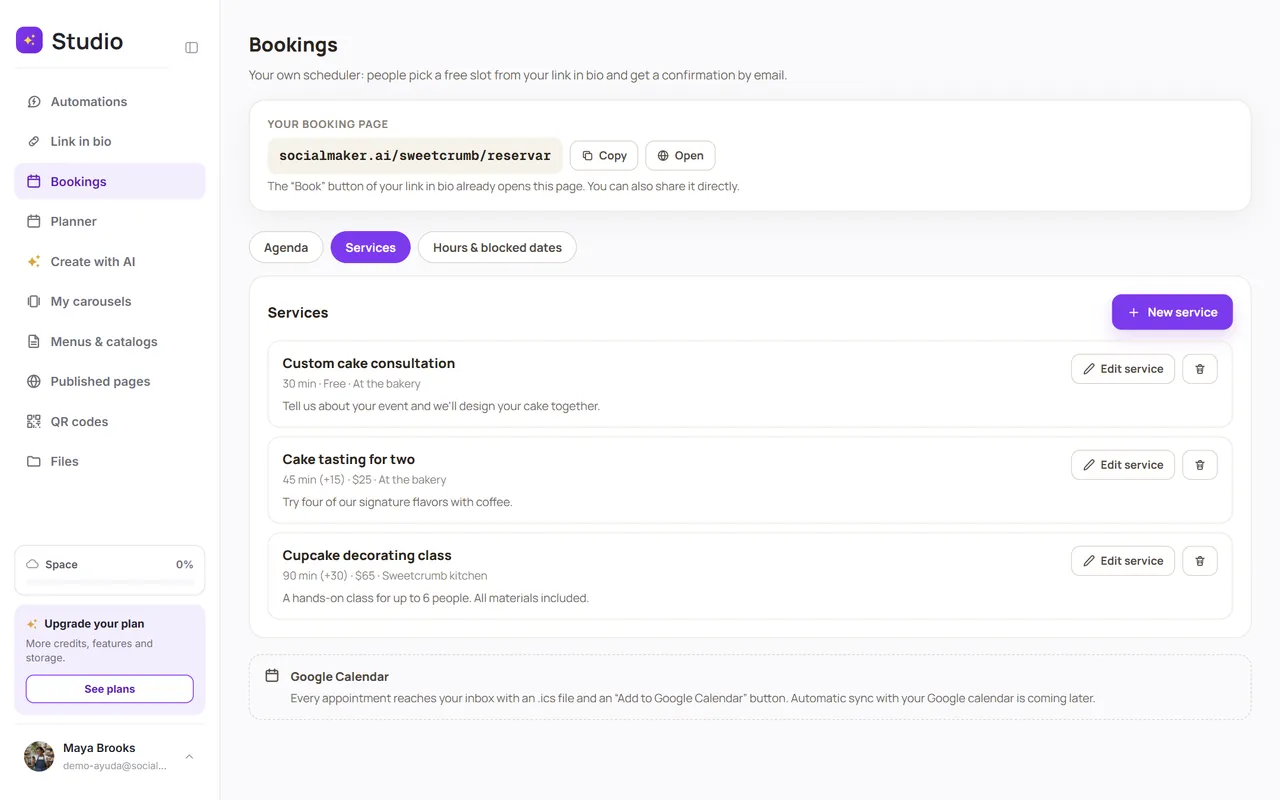
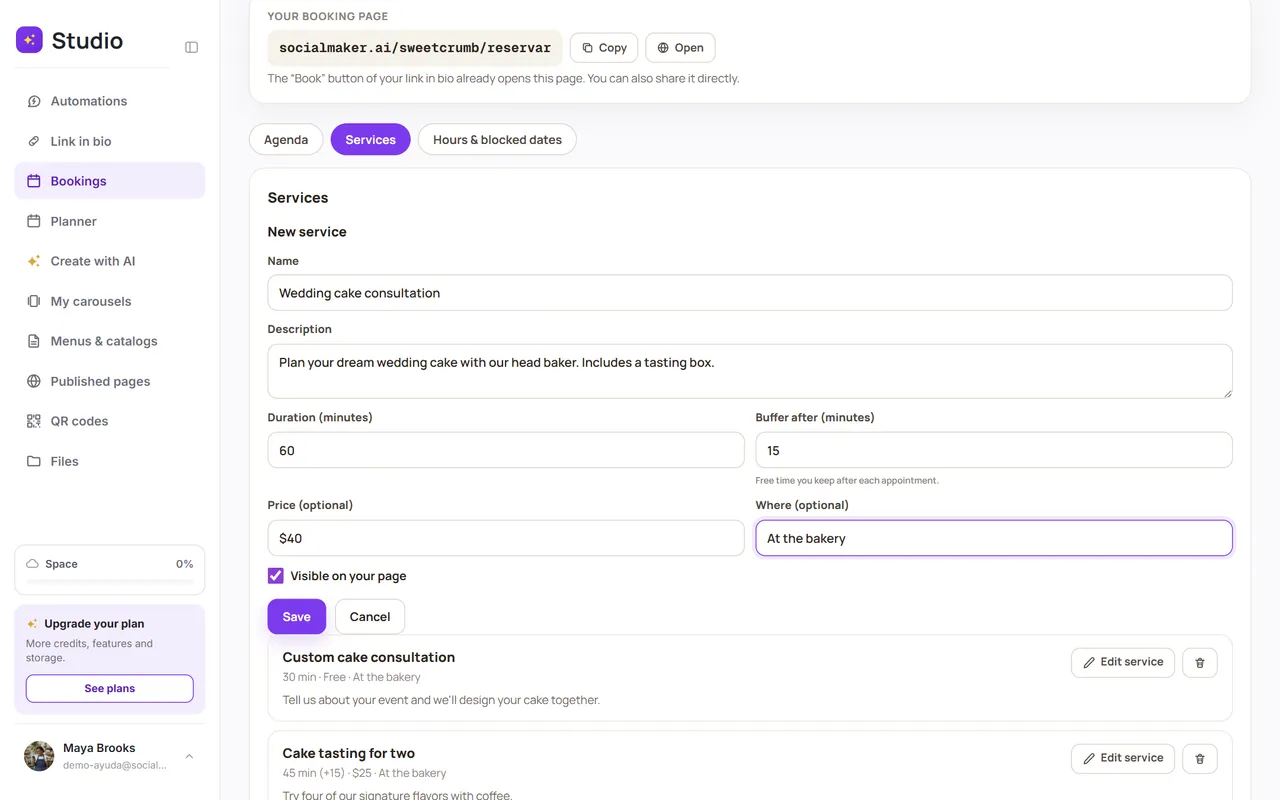
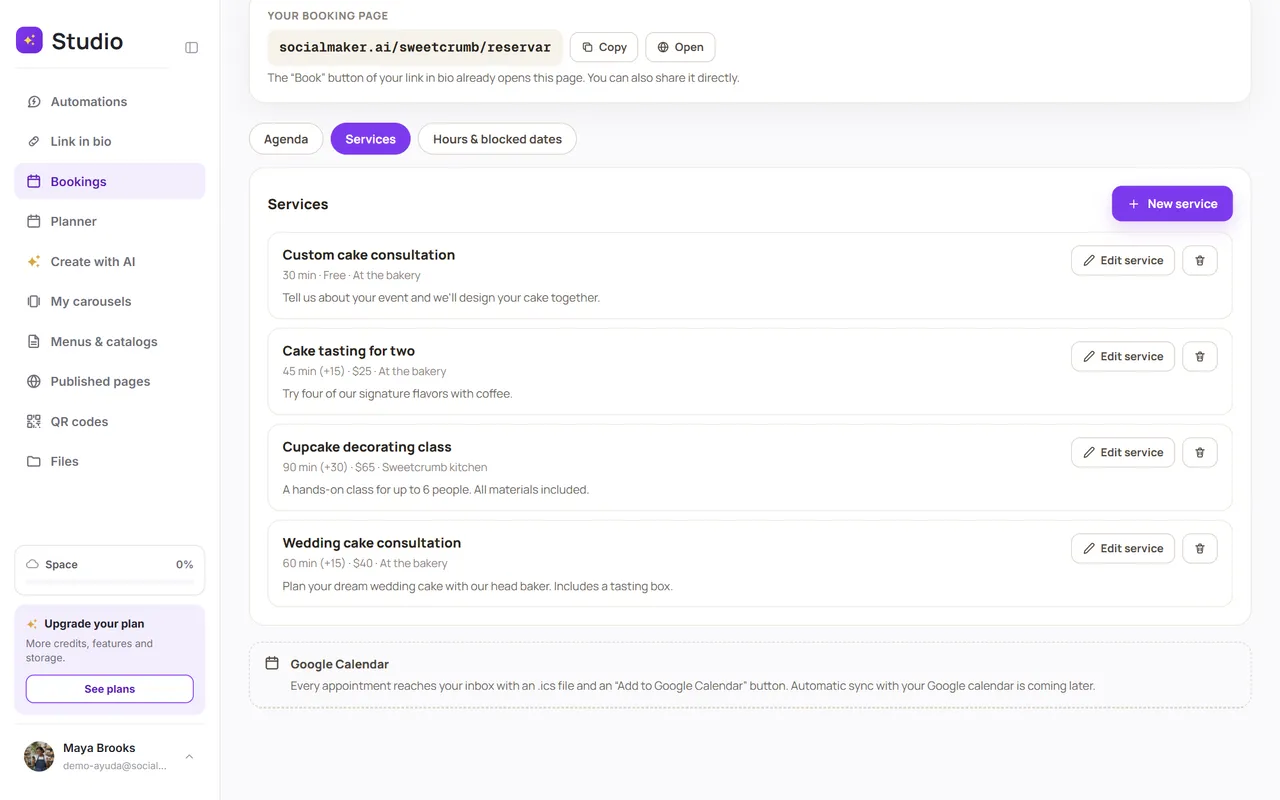
Your clients only see the open times and book in a minute, with no back-and-forth messages. See how to create your services.
Step 2: add “Book” to your link in bio
With your SocialMaker link in bio, the “Book” button goes straight to your calendar. Paste that link in your Instagram profile and anyone who visits can book at any hour, even at night or on the weekend.

Step 3: answer “any openings?” automatically
This is where the most appointments get lost. With SocialMaker's automatic replies, when someone comments BOOK on your post or messages you “hours,” they instantly get a button that opens your calendar, or a carousel with your services to pick from.
If the person books from that button, the appointment is tracked in that automation and they get a confirmation by message with the day and time. See how to send appointments and services by DM.
On the Pro or Max plan, Claude can build this automation for you too: “When someone DMs me HOURS or comments BOOK, send them the button to book.” And since Claude can also see your calendar, you can ask which slots you have free on Thursday or have it block off your Friday afternoon. We cover it in how to use Claude for Instagram.
Step 4: confirm, remind and let people reschedule
- Instant confirmation: your client gets an email with the appointment details and an invite for their calendar.
- Reminder 24 hours before: if they booked ahead, they get an email so they don't forget.
- Reschedule or cancel without messaging you: from the link in their email they pick another open time or cancel, and you hear about it right away.
- Mark “no-show”: keep track of who doesn't show up, so you can decide what to do next time.
Reminders work: in an analysis of 21 studies, attendance rose from 54% to 67% when people got message reminders, and several reminders worked better than just one (BMJ Open, 2016). And the reschedule link matters more than it seems: 77% of salon clients still think calling is the easiest way to change an appointment (Zenoti, 2025). Give it to them one tap away and they don't have to wait for you to answer.
Messages to copy for every step of the appointment
Use them in your automatic replies or keep them handy to answer faster. Swap what's in brackets for your details.
- When they ask about openings
Hi! Thanks for reaching out. Here you can see my open times and book in a minute: [link]. If you have any questions, just reply here.
- When they ask about the price
The [service] is [price] and takes [length]. If you'd like, you can pick a day and time here: [link]
- Confirmation
You're all set, [name]! See you on [day] at [time] at [place]. If you need to change the time, you can do it here: [link]
- Reminder the day before
Hi [name], just a reminder of your appointment tomorrow at [time]. If you can't make it, reschedule here so someone else can take the spot: [link]
- When they want to reschedule
No problem. Pick the time that works best for you here: [link]
- Deposit or no-show policy
To hold your spot I ask for a [amount] deposit, which comes off the total. If you let me know [24] hours ahead, we move it to another date at no cost.
- After hours
Thanks for reaching out! I'm off for the day, but you can book right now here: [link]. I'll answer any questions tomorrow.
Examples for your type of business
The idea is the same for everyone: an easy word to comment and, by message, what that person needs to decide, with the button to book.
| Business | Word to comment | What they get by message |
|---|---|---|
| Nails | NAILS | Your designs and prices in a carousel, with the button to book. |
| Barbershop | CUT | The button to see open times and book. |
| Therapist | SESSION | What the first session is like, whether it's online or in person, and the button to book. |
| Nutritionist | PLAN | What the consultation includes, the price and the button to book. |
| English teacher | CLASS | The trial class on Zoom or Google Meet and the button to book it. |
| Personal trainer | TRAIN | Your plans and the button to book the first assessment. |
| Photographer | SHOOT | Your packages, the deposit and the button to hold the date. |
| Real estate agent | TOUR | Photos of the property and the button to book the showing. |
Add the typical questions in your field (whether the first session is online, how long it takes, whether there's a deposit) and you skip the back-and-forth. For more message ideas, see Instagram auto-reply examples.
5 mistakes that lose bookings on Instagram
- Asking people to message you to see your times: every back-and-forth is a chance for them to lose interest.
- Hiding your booking link: if it's not in your bio and your story highlights, nobody finds it.
- Replying the next day: three out of four people expect a reply within 24 hours or less, and a late reply ends up at another business.
- Not confirming or reminding: an appointment with no confirmation or reminder is the one most often forgotten.
- Not letting people reschedule: if changing the time means messaging you, many people would rather not show up.
Frequently asked questions
Can you book appointments directly on Instagram?
Instagram doesn't have its own calendar. What you can do is put your calendar link in your bio and answer messages and comments with a button that opens it, so people book without leaving the conversation.
How do I add a “Book now” button to my profile?
Tap Edit profile and, under Public business information, tap Action buttons and choose “Book now.” You need a professional account (creator or business) and a booking app from Instagram's partner list. If you don't use one, put your calendar link in your bio: it works with any account.
Why isn't the “Book now” button showing up?
The most common reasons: your account is still personal, Instagram hasn't turned the feature on for your account yet (it's rolling out gradually), your booking app doesn't work in your country, or admin permission is missing on the Meta business account. In the meantime, the link in your bio works just the same.
Can I add Calendly to my Instagram profile?
Calendly isn't one of the apps that connect to the “Book now” button. What you can do is paste your calendar link in your bio or send it by message, and with an automatic reply it reaches anyone who comments or messages you on its own.
How do I create a free booking link?
With SocialMaker you set up your calendar and your link in bio on the free plan: it includes one booking service and one automation so you can try it with your clients.
What happens if someone asks for an appointment when I'm offline?
With an automation, the person gets the button to book instantly, at any hour. You just see the confirmed appointment in your calendar and an email with the details.
How do I stop clients from not showing up?
Confirm every appointment, send a reminder beforehand and let people change the time without messaging you. If someone doesn't show up, mark them as “no-show” to keep it in mind.
Can I send appointment reminders on Instagram?
Yes, by hand: Instagram lets you schedule a text message in a chat with a date and time. If people book through your SocialMaker calendar, they also get an email reminder 24 hours before, automatically.
Is it better to take bookings on Instagram or WhatsApp?
Your calendar link works on both: you can share it on WhatsApp too. SocialMaker's automatic replies work on Instagram and Facebook.
Taking bookings on Instagram doesn't have to be a mess of messages. With your calendar in your bio and an automatic reply to “any openings?”, your clients book on their own and you focus on your work. If you want to go further, see the 5 automations every business needs.

Written byAndros BlandonSocialMaker