Connect Instagram and Facebook
How to connect your professional Instagram account and your Facebook page to automate messages and publish from SocialMaker.
SocialMaker connects to Instagram and Facebook through the official Meta API: we never ask for your password, and you can remove access whenever you want. Once connected, the same account works for both automations and publishing.
Before you start
- Your Instagram must be a professional account (business or creator). You can switch for free in Instagram → Settings → Account type.
- For Facebook, you need to be an admin of the page you want to connect.
- Use the browser where you're already signed in to Instagram or Facebook: it makes the process faster.
Step by step
Open Settings → Connections
You can also start from Automations or the Planner: if you don't have an account connected, they show you the button to connect one.
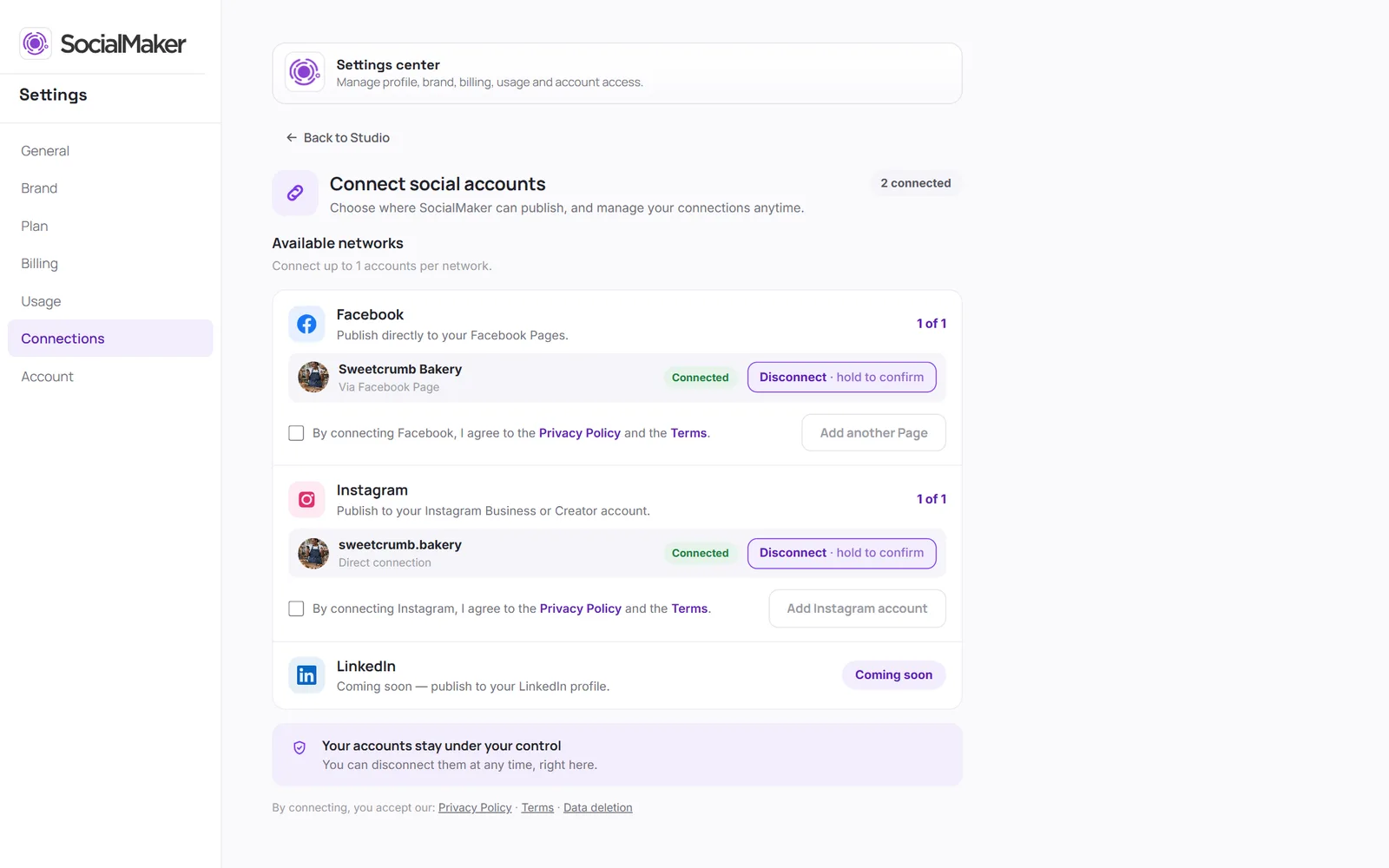
Choose Instagram or Facebook
The official Meta window opens. Sign in with the account you want to connect.
Accept the permissions
Meta shows you what SocialMaker will be able to do: read comments, reply to messages and publish. All of them are needed for automations and the planner to work.
Done
You're back in SocialMaker with the account connected. You'll see its name and photo in Automations and in the Planner.
LinkedIn connects the same way, from Settings → Connections, and works for scheduling posts. Automations only work on Instagram and Facebook.
Remove an account
In Settings → Connections you can disconnect any account. Its automations stop responding until you reconnect it.