Make it feel human: pauses and a heart on their stickers
Make your automatic replies feel more natural with the “typing…” pause and a heart when someone sends you a sticker or a photo. On Pro and Max.
At the top of the flow, in step 2, you have two toggles that make the conversation feel like a person is replying. They're on the Pro and Max plans, and the templates come with them turned on.
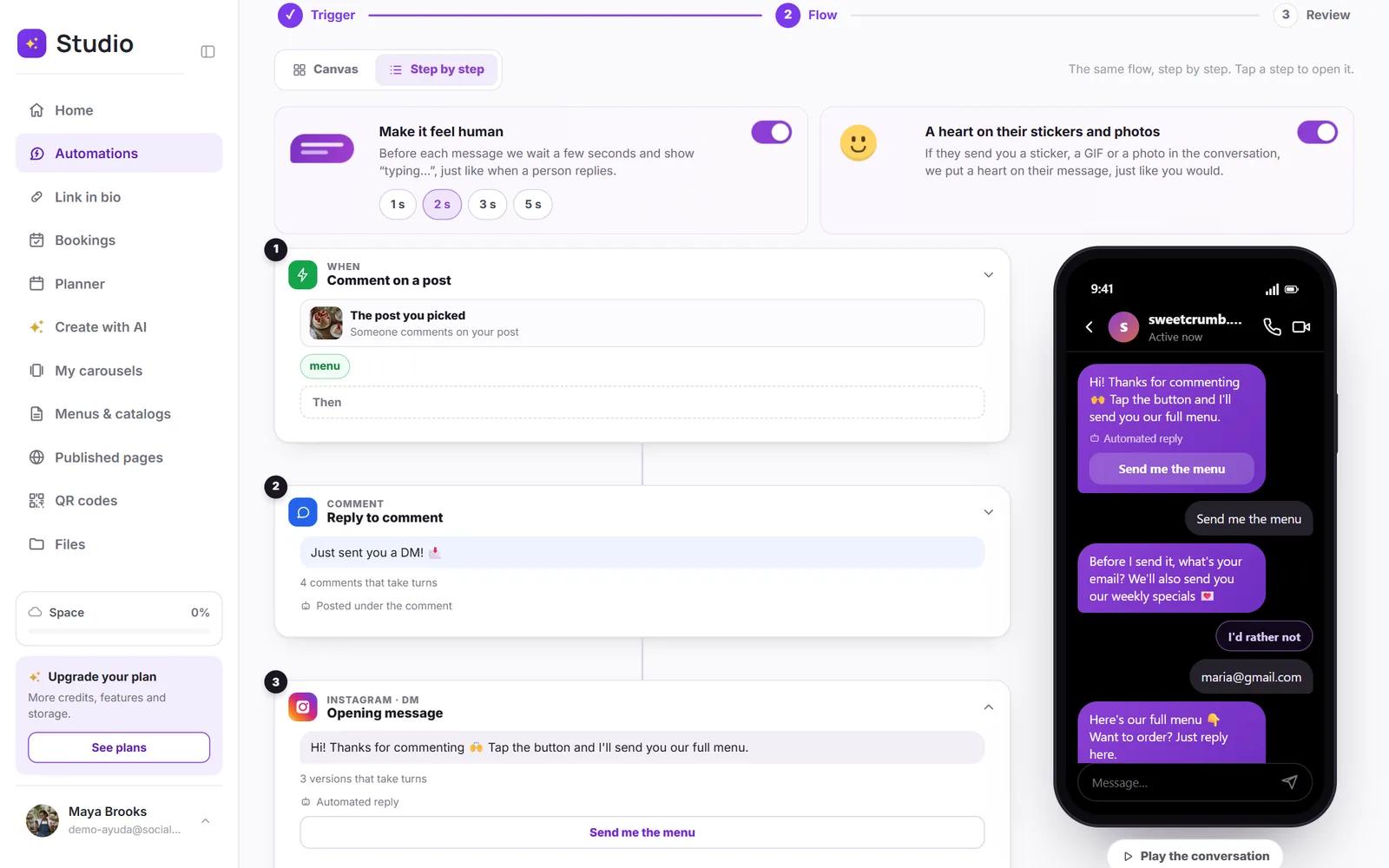
Pauses with “typing…”
In the conversation, before each message the person sees “typing…”, and a few seconds later the message arrives. The first message to someone who commented goes out right away: it's the reply to their comment. Choose the wait with the buttons on the card: 1, 2, 3 or 5 seconds.
- The pause goes in private messages, never in the public comment.
- If a send has several messages, the pauses are spread out so everything arrives in under 30 seconds, as Meta asks.
- Messages always arrive in order.
A heart on their stickers and photos
If the person sends you a sticker, a GIF or a photo in the conversation, a heart goes on their message, just like you'd do. It's the “thank you” lots of people send when they get what they asked for.
- It only happens within the hour after a message from your automation.
- Never in just any chat on your account: a photo someone sends you about something else doesn't get a heart.
- If you reply yourself in that conversation, the heart turns off there.
- If they write something along with the photo, there's no heart: you read that message yourself.